Financial reports: trial balance, P&L, balance sheet, ledger and VAT
Prove your books: a trial balance that ties, the profit and loss for any range, a balance sheet that says whether it balances, an account’s ledger with its running balance, and the VAT of a period.
Checked against the product on 11 November 2026
FinanceAccountingLedgerReports has five reports, one per tab: Trial Balance, Profit & Loss, Balance Sheet, General Ledger and VAT. Each opens on the fiscal year to date — from the first day of the year today falls in, to today — so Generate shows it at once; change the dates for any other range. Every report reads posted entries only: drafts and discarded entries are left out, and an entry that was reversed is left out together with its reversal. Amounts are in dollars.
Excel, CSV and PDF export the report on screen, with the same figures and totals.
Trial Balance
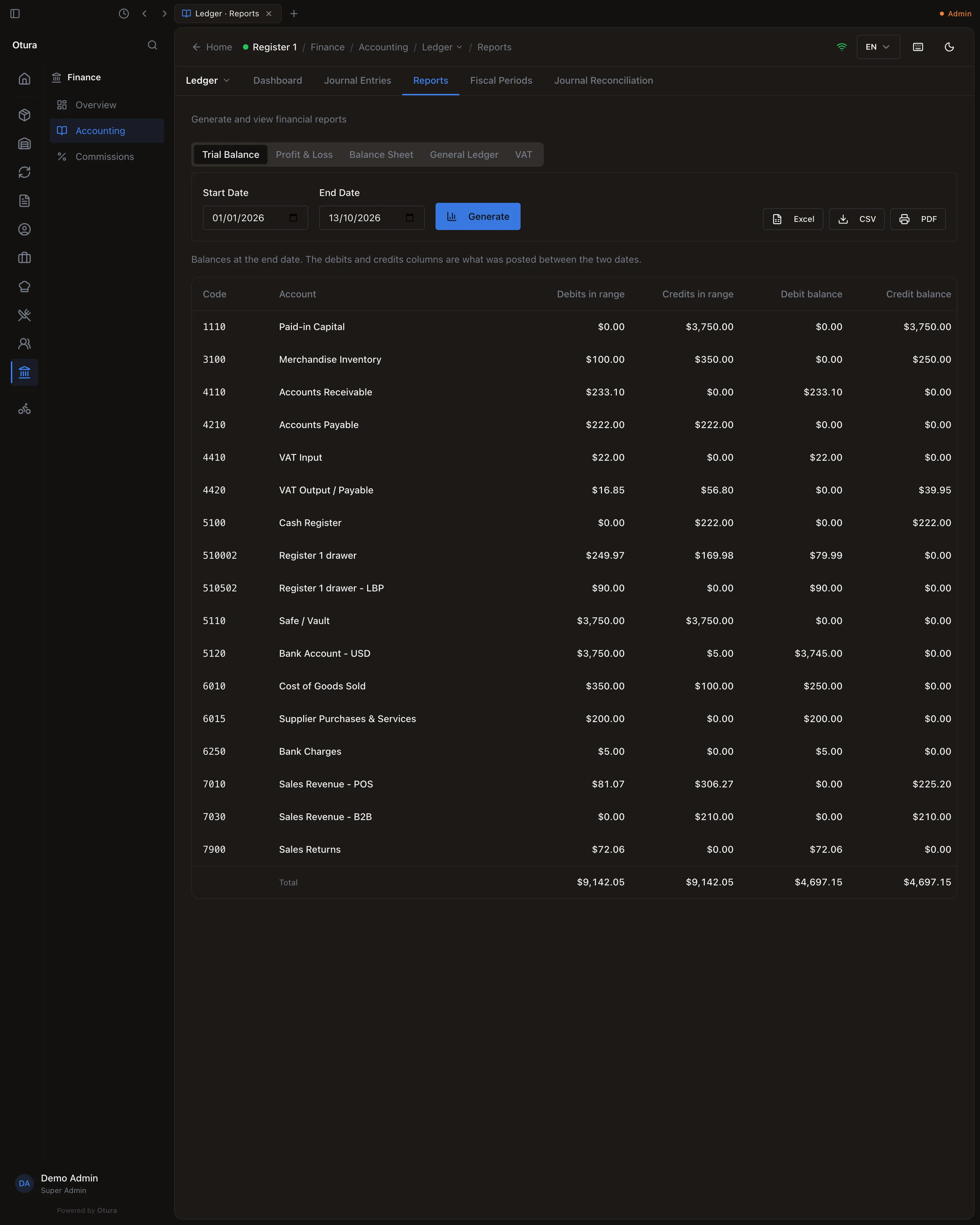
Every account with a balance at the End Date, or with postings between the two dates, in code order:
| Column | What it is |
|---|---|
| Debits in range, Credits in range | What was posted to the account between the Start Date and the End Date |
| Debit balance, Credit balance | What the account holds at the End Date — everything posted up to it — on the side it is on |
The footer totals each column. In a sound ledger the two range columns are equal, and so are the two balance columns. A trial balance at the last day of a year you have closed shows its income and expense accounts at zero: the year-end close moved them into retained earnings (the Profit & Loss still shows the year).
Profit & Loss
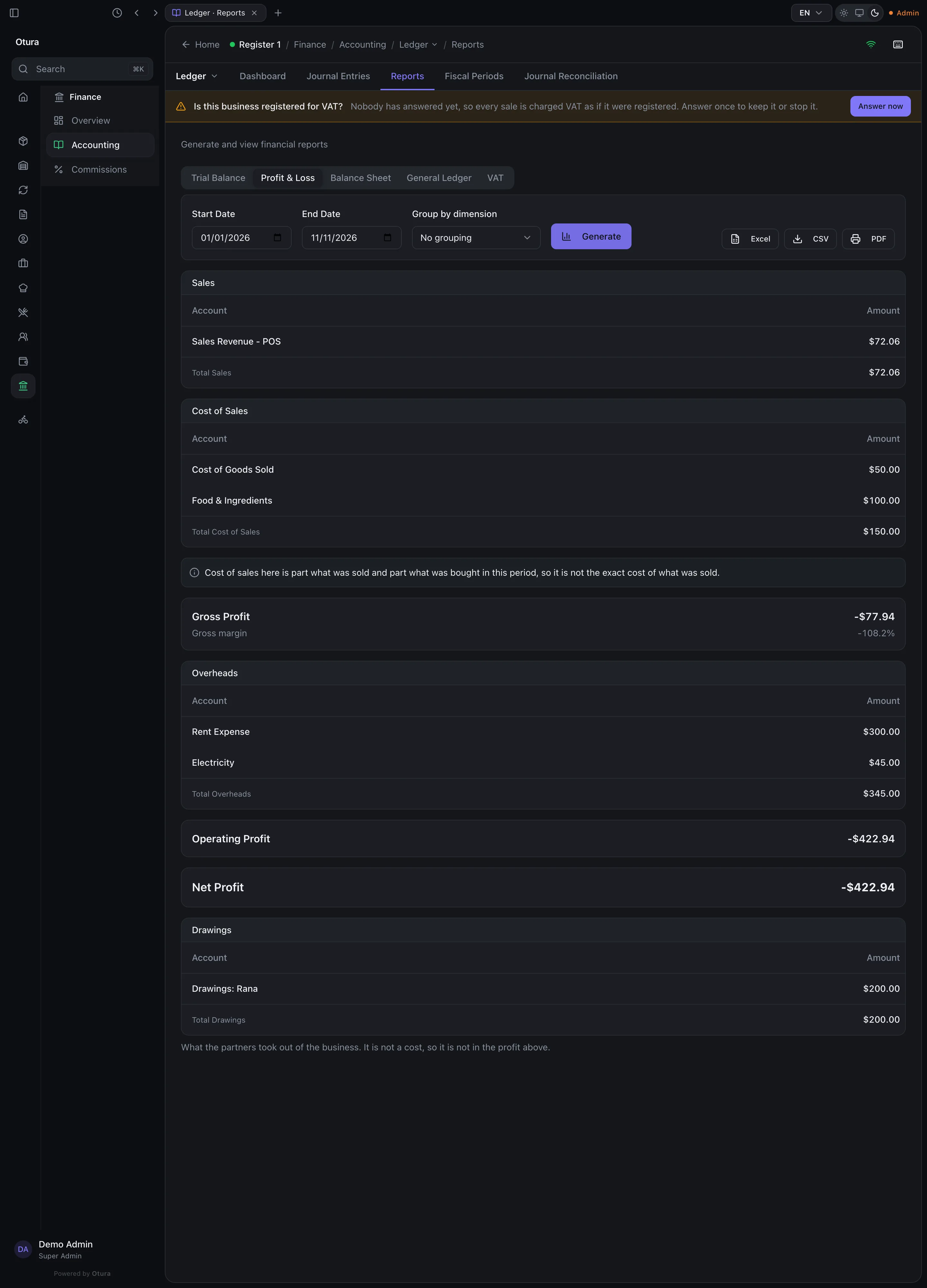
The page reads top to bottom for the range, before VAT: Sales (less returns and discounts), Cost of Sales, Gross Profit, Overheads, Operating Profit, Other gains and losses, Income Tax and Net Profit. Under the profit, Drawings lists what each partner took out. It is not a cost, so it is not in the profit above (see Partners and drawings). The year-end closing entry is left out, so a closed year still shows what it earned and what was taken. Group by dimension splits it by cost center, department, channel, project or location, with an Unassigned column for what carries none. Other gains and losses and Income Tax appear only when the range has something in them, in the Excel, CSV and PDF files too.
| Line | What is in it |
|---|---|
| Sales | What was sold, less returns and discounts. Nothing else: a cash overage or interest from the bank is not a sale. |
| Cost of Sales | The cost a sale carried, and every expense whose category counts as cost of sales (see Recording expenses). |
| Overheads | Every other expense: rent, electricity, salaries, repairs. |
| Other gains and losses | Cash over and short at a count, exchange gains and losses, and interest from the bank. |
| Income Tax | Income tax for the period. |
| Drawings | What each partner took, by name, beneath the profit. |
What Cost of Sales is made of
A restaurant that sells plates with no stock behind them has no cost on any sale: its cost of sales is the food it buys. The page says which it is reading, under Cost of Sales:
| The page says | What it means |
|---|---|
| Cost of sales here is what was bought in this period, not what was sold. A period of heavy buying reads as a weak one, and stock left on the shelf is counted as spent. | The cost is all purchases. A month you stocked up reads as a poor one, and the next as a good one. |
| Cost of sales here is part what was sold and part what was bought in this period, so it is not the exact cost of what was sold. | Some of it came from sales and some from purchases. |
| No cost of what was sold has been recorded yet, so the profit here is higher than it really was. | Something was sold in the range, and there is no cost of sales at all. |
With every cost coming from what was sold, or nothing sold in the range, the page says nothing.
Sales with no cost
A till sale of a product that tracks stock costs each unit from its batch, then from the stock record's cost. A unit with neither has no cost, which is not the same as being free, and Sales with no cost gives the money sold that way, before VAT, beside Cost of Sales. The profit reads high by the cost of those goods. The line is only there when the figure is above zero. A dish counts whole when any one of its ingredients has no cost.
A stock record's cost that would put more than 100 times a line's price against it is not used, and the line counts here instead. That is nearly always lira typed into the dollar cost: correct it on the stock record, and later sales cost from it. A batch's own cost, which a receipt booked, is always used, and a line sold at $0.00 is not checked.

What comes back comes off, and a void comes off on the day of the void, so a closed month reads as it closed. A product that tracks no stock is never in this line: its cost is what you bought. A sale made before this version reached your business is not in it either, and is not recosted: costing starts from the day it arrives, and your margin can read lower from that day because the sales now carry a cost they did not carry before.
Balance Sheet
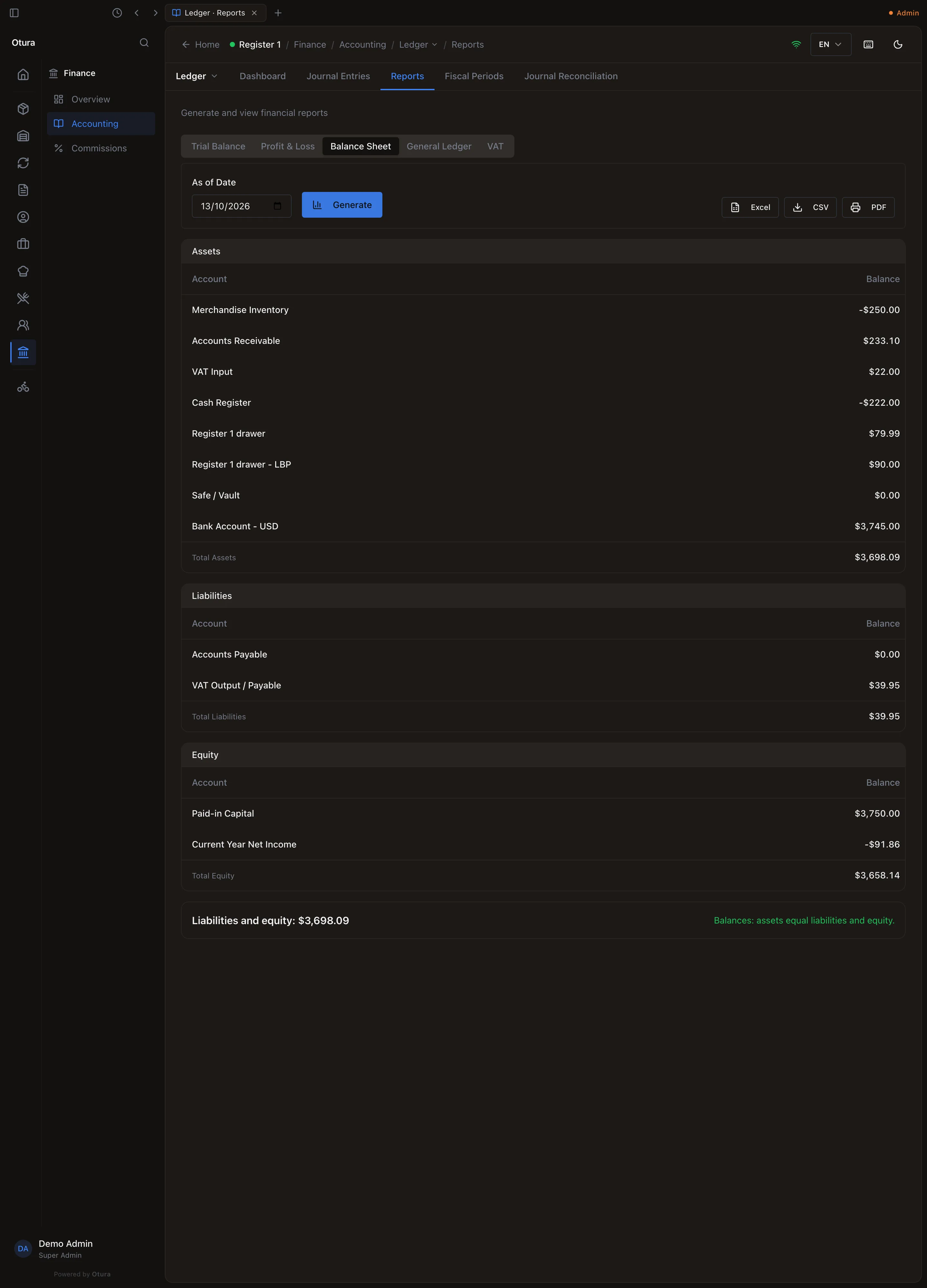
Assets, Liabilities and Equity at the As of Date. Equity includes the year's result so far as Current Year Net Income, and the result of a past year not yet closed on its own line. The last line adds up Liabilities and equity and says whether the sheet balances: Balances: assets equal liabilities and equity. or Out of balance by ….
General Ledger
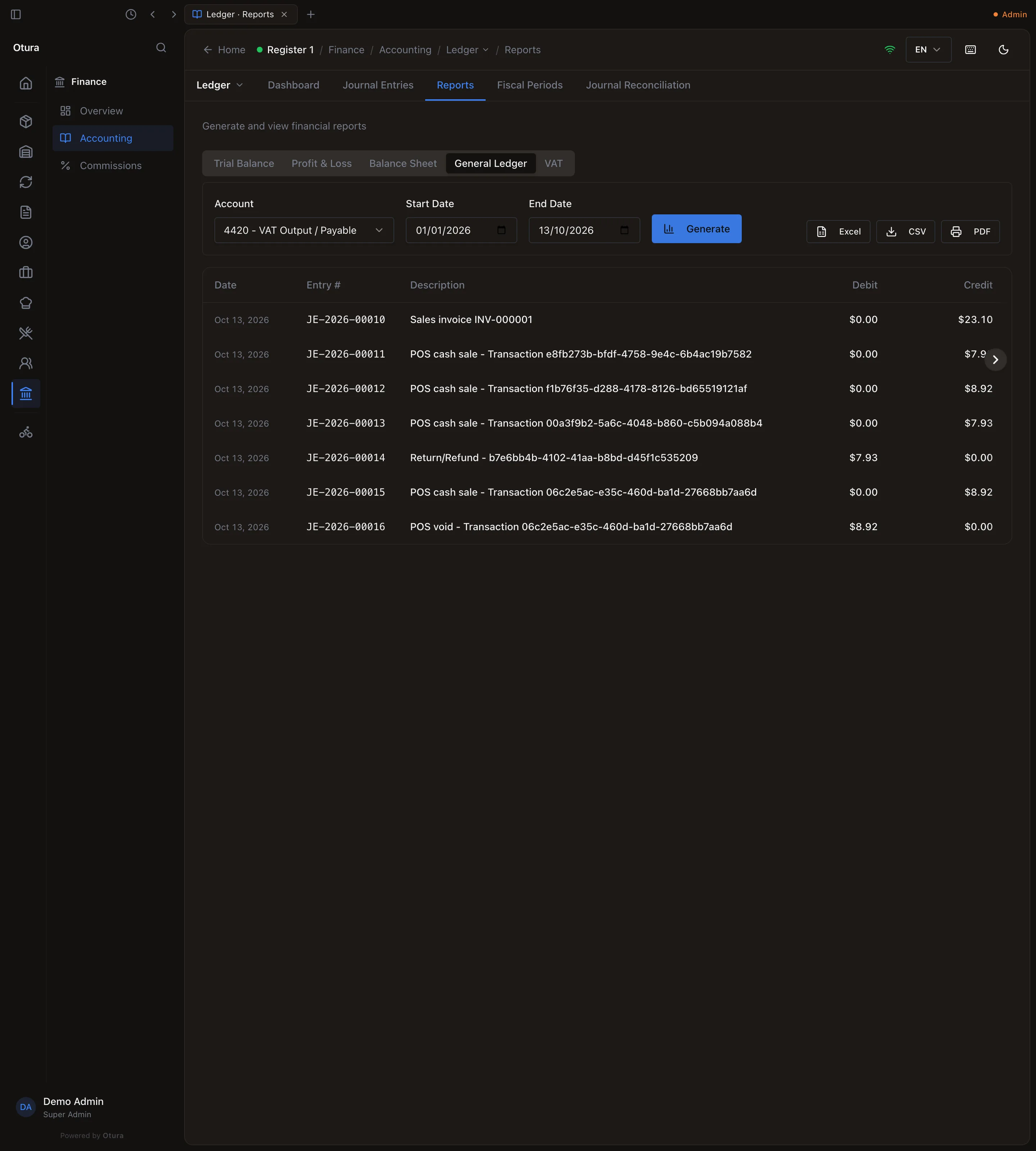
Choose an Account and the dates, one year at most: a longer range is refused, and the page says how many days it is. The page shows the range's Opening balance, Total Debit, Total Credit and Closing balance (and the lira balances, for a lira account), then each posted line — Date, Entry #, Description, Debit, Credit and the running Balance, in dollars and, for a lira account, in lira. The closing balance is the account's line on the trial balance for the same end date.
The screen lists the first 5,000 lines, and says so when there are more: Showing the first 5,000 of … rows. Narrow the range, or export to get every row. The balances above still cover the whole range, and the Excel, CSV and PDF exports carry every line.
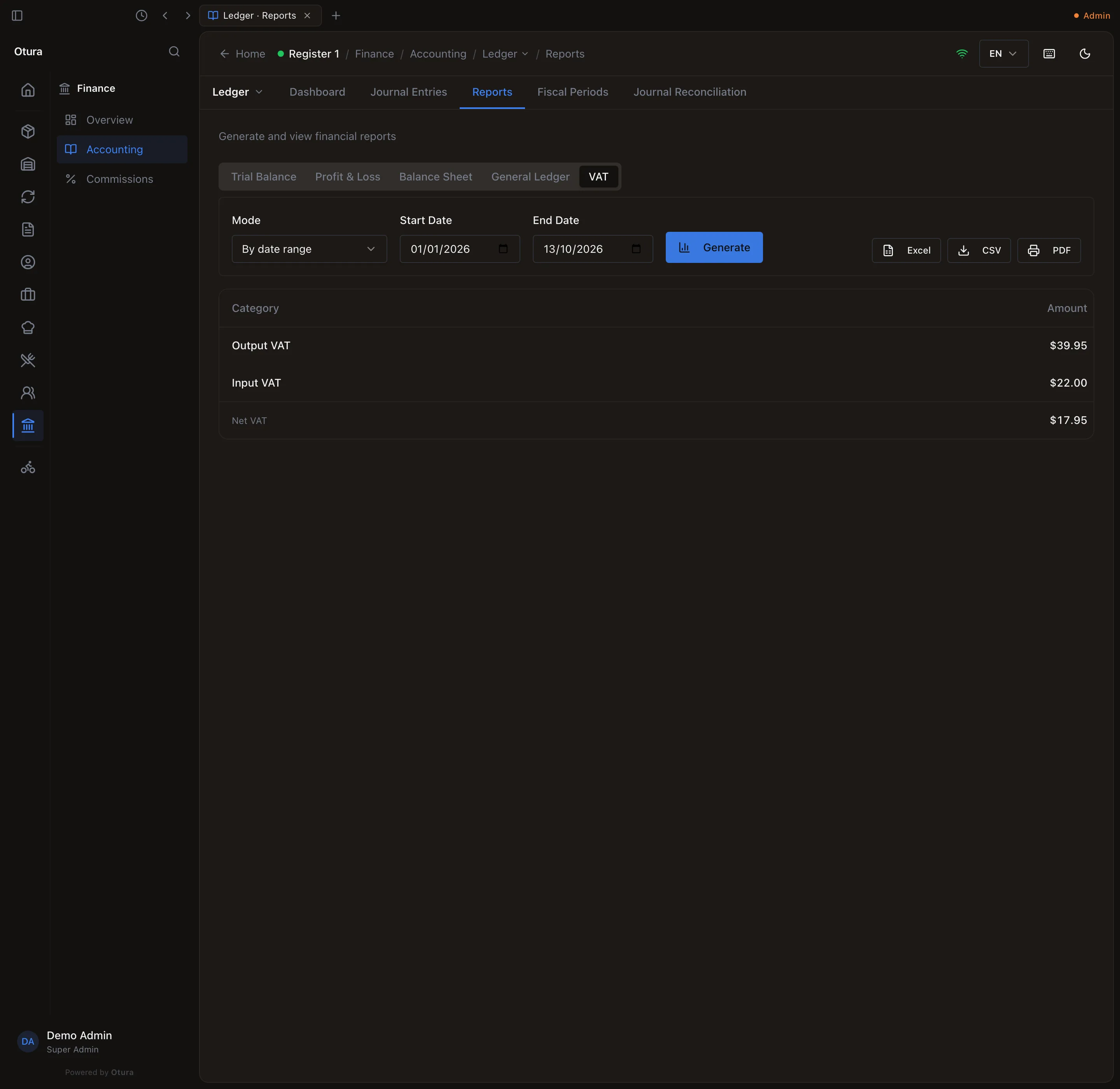
VAT
The VAT Otura recorded for a period, by category: Output VAT on sales, Input VAT on purchases and Net VAT. Mode chooses By period (a fiscal year and one of its months) or By date range. It is a view of the tax ledger, for checking during a quarter; the return you file is built on VAT Returns.
What each everyday event does to these accounts, and when in the month and year to run the reports, are in How money moves and Your money routine.